Showing posts with label Help Desk. Show all posts

Friday, April 4, 2008

Will BlogPatrol work on my blog?

Will BlogPatrol work on my blog? In its current form, BlogPatrol will only work with blogs, blogging platforms, and blog hosting providers that accept javascript code. Here is a short list of compatible and non-compatible providers and platforms. When possible the provider or platform is linked to more information concerning compatibility/non-compatibility.

Blog Hosting Providers

Blogging Platforms
  • BlogPatrol currently works on WordPress hosted on your own server (i.e., not hosted by WordPress.com) For example, see the fun blog named Larry Hnetka Goes HMmmm which runs on WordPress 2.0.4.
  • ...more to be added...
Queue of platforms/providers to be categorized:
  • Adobe GoLive
  • AOL Journal
  • AOL Publisher / AOL Easy Designer
  • Bloglines
  • Dreamweaver
  • Dreamweaver MX 2004
  • FrontPage 2000/2002/2003
  • FrontPage/FrontPage Express
  • Googlepages.com
  • Homestead.com
  • HTML Code
  • iWeb
  • ixla Web Easy
  • Meetup
  • Microsoft Publisher 2000
  • Microsoft WordPad
  • Microsoft Word 2000/2003
  • mo'time
  • Movable Type 3.0
  • MSN Group
  • MSN Spaces Blog
  • MySite
  • Namo WebEditor
  • NetObjects
  • Netscope Gold or Netscape Composer
  • Ning.com
  • Open Diary
  • Print Shop 6.0 Web Designer
  • Roodo.com
  • Serif Webplus 8
  • Sierra's Web Studio 2.0
  • Site Meter HTML for a PHP-Nuke
  • Squarespace
  • Validating XHTML for XHTML 1.0 Strict and Transitional pages
  • Vox
  • WebExpress 4.0 Macmillan software Web Page Construction Kit 6.0
  • WebTV
  • Wikispaces
  • ...and more...

Last updated: June 13, 2008, 7:28 AM Eastern (UTC -4 America/New York)

If you like this article, then click on this link to "Digg It" and help promote BlogPatrol.com. Thanks!

Thursday, February 28, 2008

How do I change the Time Zone of my BlogPatrol Account?

Question: How do I change the time zone of my BlogPatrol account?

Answer: You can change the time zone of your BlogPatrol account at any time by (1) logging into your BlogPatrol account, (2) opening the list of timezones, (3) selecting a different timezone, and (4) clicking the "Modify" button to save the change(s) you have selected.

For more information, see the screen shot below. (Click on the picture to view an enlarged version of the image.)

If you like this article, then click on this link to "Digg It" and help promote BlogPatrol.com. Thanks!

Tuesday, January 29, 2008

How do I change the style of my BlogPatrol counter widget (icon or logo)?

Question: How do I change the style of my BlogPatrol counter icon (i.e., BlogPatrol widget or BlogPatrol logo) to a different style? or from an icon that shows the number of visitors to a stealth icon that does not?

Answer: You can change the style of your BlogPatrol counter icon at any time -- without having to re-install the code -- by logging into your BlogPatrol account, selecting a different style, and then saving the change(s) you have selected.

For more information, see the screen shot below. (Click on the picture to view an enlarged version of the image.)

If you like this article, then click on this link to "Digg It" and help promote BlogPatrol.com. Thanks!

Tuesday, January 22, 2008

How to Fix your BlogPatrol Account

Originally posted on January 22, 2008 at 4:47 PM UTC-5 America/New York.
Last updated on January 25, 2008 at 4:12 AM.

BlogPatrol users are reporting that BlogPatrol has stopped working on their Blogger (blogspot.com) blogs as of last Friday, January 18, 2008.

Symptoms:

  1. Not all BlogPatrol accounts are affected. It appears that those Blogspot.com blogs which have the BlogPatrol code installed in the footer (i.e., along the bottom) of their blog template are the ones experiencing problems.
  2. When you view the Layout and Page Elements of your blog on Blogspot.com, you do not see any Page Element label where you have installed the BlogPatrol code. (Prior to 2007, Blogspot.com used to allow insertion of code like BlogPatrol's directly into the HTML template. Since 2007, bloggers now have to insert BlogPatrol code as a Page Element.) It appears that Blogspot.com has done some kind of refresh where "legacy installations" of BlogPatrol's code that used to work now no longer work after January 18, 2008.

To get your BlogPatrol account working again:

  1. remove the BlogPatrol code where you have it installed now
  2. install it on your blog again using our instructions

In case you need it, the long form of the URL for our install instructions is http://thepatrolblog.blogspot.com/search/label/Install%20on%20Blogger

If you would like personalized assistance from BlogPatrol Support, please contact us using our web contact form. Thanks as always for using the BlogPatrol service.

If you like this article, then click on this link to "Digg It" and help promote BlogPatrol.com. Thanks!

Tuesday, July 31, 2007

Meaningful Collaboration and Useful Web Stats

Thanks to all of you who commented or emailed feedback on the general login problem. In our follow-up with the users reporting in problems, everyone confirmed the ability to login as of July 29. Your timely collaboration quickly informed us when our efforts worked and when they didn't. Thank you!

During the week (July 20 to 26) that the login problem escalated to a majority of users, the BlogPatrol Web Browsers in Use report helped us to figure out that 62.35% of BlogPatrol users who accessed their account could not login successfully.

We obtained this info by doing the following nine (9) steps to:

  • access the Web Browsers in Use report
  • interact with the report using the pie chart rotation and pie chart slicing features
  • manually add up the numbers to determine the total percentage of users affected.

Step 1 of 9: Go to the BlogPatrol.com homepage and click on the Demo Stats link (located under the Signup Now menu).


Step 2 of 9: Click on the report link labeled Visitor Technologies.


Step 3 of 9: You will get three reports: Operating Systems in Use, Web Browsers in Use, and Screen Resolutions in Use. If you need to, scroll down your browser so that the Web Browsers in Use report is in full view, as shown below.


Step 4 of 9: You can hover your mouse over the (?) question mark that appears after the Web Browsers in Use report title to view instructions for interacting with the report: "Left click on a pie slice to move the slice away from the pie. Right click on the pie and Enable Rotation to rotate the pie chart."


Step 5 of 9: First, do the PIE CHART ROTATION by following the instructions: "...Right click on the pie and Enable Rotation to rotate the pie chart." When the mini-menu appears, as shown below, click on the Enable Rotation link.


Step 6 of 9: Once rotation is enabled, do a click-and-drag motion with your cursor to turn the pie chart in one direction or the other.


Step 7 of 9: Second, enable the PIE CHART SLICING by following the instructions: "...Right click on the pie and Enable Slicing Movement to rotate the pie chart." When the mini-menu appears, as shown below, click on the Enable Slicing Movement link.


Step 8 of 9: Click on each of the pie sections that you want to slice out. The section you click on will slice outward and away from the rest of the pie chart.

You can do this by clicking on the graphical part of the pie slice (1) or by clicking on the text for a slice (2). The second method is useful for slices that are too narrow to easily click on the graphical portion. Both methods are illustrated by the arrows in the screen shot below.


Step 9 of 9: Slice out all of the slices that you want to analyze more closely.

In our illustration, we sliced out the browsers that we knew were affected by the login problem: Internet Explorer 6, Internet Explorer 7, Safari, Opera 7.x, and Opera 9.x.

The values of these slices are listed below in the order presented by the pie chart:

  • MS Internet Explorer 7 = 19.07% (1,047 instances)
  • Safari = 2.8% (152 instances)
  • Opera 9.x = 2.4% (132 instances)
  • Opera 7.x = 1.8% (99 instances)
  • MS Internet Explorer 6 = 36.28% (1,992 instances)

The total, which we added up using a spreadsheet, was 62.35%.

So that's how we used our Web Browsers in Use stats report to determine that 62.35% of all BlogPatrol users were affected by the general login problem. We're pleased to report that 100% of users are currently able to access their account.

As always, if you're having any problems or issues with your BlogPatrol account, please let us know through our contact form.

If you like this article, then click on this link to "Digg It" and help promote BlogPatrol.com. Thanks!

Friday, July 27, 2007

Status Report: Users could not login or stay logged in

Status Report: Error resolved as of August 5, 2007, 9:58 AM Eastern (UTC -4 America/New York)

Updated on Sunday, August 5, 9:58 AM:

  • The solution we've implemented has allowed all users to login for more than a week, so we're gladly declaring this issue resolved.
  • The Set Cookie and IE7 thread on the SitePoint Forum helped us to figure out a solution to this issue. Thanks, seiya and Azmeen (1, 2, 3)!
  • We also posted a follow up article titled Meaningful Collaboration and Useful Web Stats to walk through how we used the BlogPatrol Web Browsers in Use report to estimate the number of users affected by the issue.

Update on Friday, July 27, 3:46 PM:
  • We have implemented a potential solution that should allow all BlogPatrol users of all browser types to successfully login and view their stats.
  • Let's all of us see how the system performs over the next 24 to 48 hours before we re-declare any kind of victory over this issue.
Update on Thursday, July 26, 5:16 PM:
  • BlogPatrol previously set cookies fine without any code related changes, we believe our next step is to adhere to P3P (the Platform for Privacy Preferences specification).
  • Until now, BlogPatrol did not have a P3P policy, so this may be the reason that the cookie is not setting correctly: http://msdn2.microsoft.com/en-us/library/ms537343.aspx
  • We are currently working on and implementing a P3P policy to see if this will meet Microsoft's privacy requirements.
Updates on Wednesday, July 25, 2007:
  • 5:16 PM: We are currently creating a P3P policy to see if this will satisfy Microsoft's Internet Explorer browser requirements.
  • 3:43 PM: We tried several workarounds suggested on developer sites, but none of these have solved the problem.
  • 12:28 PM: Problem has recurred and we are actively troubleshooting this issue (with a vengeance) and will post an update soon.
  • Error was thought to be resolved as of afternoon of 4:11 PM Eastern on 7/25/2007.
  • As of morning of 7/25/2007, fixing this issue is our Number One priority
  • Bug initially reported on 6/12/2007

Bug Report #1: "4 out of 4 times after I successfully login and click on any of the "view stats" links, the system asks for my login and password again. So I re-insert password and login name and hit enter, and the exact same thing happens all over again! What am I doing wrong?"

Bug Report #2: "I've been experiencing the same problem over and over again. I enter my login details, and it says that they are incorrect! I have to enter them about 10 times until it recognizes it and logs me in."

Error: The username/password verification is relying on a browser cookie to track user sessions. If the cookie cannot be set correctly due to permissions or user settings, the session immediately expires when the user clicks to a different page, such as the stats report pages.

Additional Info:
  • As of 7/25/2007, our testing showed the error occurring in Internet Explorer 6, Internet Explorer 7, and Opera browsers. Users of Firefox 2 and Netscape 8 have not been having any problems.
  • Users reporting this problem have tried the following solution without success in being able to login or to stay logged in to view their reports.

PREVIOUS SOLUTION: On 7/25/2007, we reviewed the source code line by line and updated it to force all browsers to set and read the BlogPatrol cookie correctly. Our testing showed that the cookie appeared to be set correctly on every browser and version tested (IE6, IE7, Opera, Firefox 2, Netscape 8). We are currently investigating what else is wrong, since the problem has returned as of 7/26/2007.


THIS DOES NOT WORK FOR USERS OF IE6 AND IE7: Users who can login (but cannot view their stats) should make their stats reports viewable by the public. Make your stats public by the unchecking the box labeled "Password-protect my stats reports so that they do not appear on Google search results" in your Account Settings as shown in the screen shot below.


(Click on this image for a larger view)

Status Report: Error resolved as of August 5, 2007, 9:58 AM Eastern (UTC -4 America/New York)

If you like this article, then click on this link to "Digg It" and help promote BlogPatrol.com. Thanks!

Tuesday, July 24, 2007

Known BlogPatrol Issues

We are monitoring the system performance and identifying issues that range from bug fixes to desired enhancements for BlogPatrol 1.5. We are regularly updating our list of known issues that are resolved and unresolved:

Unresolved

Resolved

Last updated:Wednesday, July 25, 2007, 4:31 PM Eastern (UTC-4 America/New York)

If you like this article, then click on this link to "Digg It" and help promote BlogPatrol.com. Thanks!

Friday, July 20, 2007

What is 'Ban my IP' and How do I use it?

After you have created your BlogPatrol account, you can use the Ban my IP option, which means that BlogPatrol will ignore visits and hits from your computer.

You will find the Ban my IP data field located between the Visitor Count and Timezone data fields.

As shown in the the screen shot below, click on the my address is button for BlogPatrol to fill in the IP address of your computer's current internet connection for you.


Remember to click the modify button to save your changes. When you save your changes successfully, the website will return a success page:


If you like this article, then click on this link to "Digg It" and help promote BlogPatrol.com. Thanks!

Sunday, July 1, 2007

Public vs Private - Stats, Stealth and Invisible counter widgets

QUESTION: “Hi. Do I have to put up the counter code on my blog? I just want to know the stats, but I don't want to show everyone the stats. Thanks!”

ANSWER:

Great question! In order for BlogPatrol to count stats for your blog, the BlogPatrol counter code must be copied into your blog's HTML template code. Otherwise, it is physically impossible for our site to track the visits to your site. Our terms and conditions also require that active BlogPatrol accounts display one of our counter icons on your blog or website.

We offer two types of blog counter widgets or icons: "Stats widgets" and "Stealth widgets", which are defined as:

  • Stats Widgets: Counter icons that display the total number of unique visitors to your blog. (When the same visitor returns to your site, s/he is recorded as a unique visitor if the visit occurs more than 24 hours after the previous visit.) We offer 18 different stats widgets which you can choose when you signup. You can also change this choice at any time by logging into your BlogPatrol account, selecting a different widget icon, and clicking the "Modify" button.
  • Stealth Widgets: Smaller-sized counter icons that do not display any stats. We offer 6 different stealth widgets. You can interchange among stats and stealth widgets at any time by logging into your BlogPatrol account, selecting a different widget icon, and clicking the "Modify" button.
  • Invisible Widgets: Represent counter code which displays nothing on your blog. We do not currently offer "Invisible widgets".

When one of your visitors clicks on the BlogPatrol widget (whether stats or stealth), they are taken to the BlogPatrol homepage. Please note that making your stats public allows others access to your stats reports, but not to any of your account information, particularly username and email address.

An additional layer of privacy that we provide to users is the option to password-protect one's stats reports. The following information is published on our Privacy Policy page :

~ If you wish to make your BlogPatrol statistics private, please select the checkbox labeled "Password-protect my stats reports so that they do not appear on Google search results" option in your account settings. Private statistics do not appear in Google and other search engine results.

~ Many users like to share their site statistics with the public, so they do not "password protect" their BlogPatrol accounts. Public statistics are indexed and searchable by Google and other search engines.

~ Public statistics can easily be shared by emailing or bookmarking the unique URL of one's BlogPatrol account. For example, one can email or bookmark the unique URL of the BlogPatrol demo stats account.

~ Also, public statistics have the View link after the blog URL on the BlogPatrol Top Blogs rankings page; private statistics do not.

~ An important distinction is that making your stats public allows others access to your stats reports, but not to any of your account information, particularly username and email address.

~ Converting from public stats to private stats will prevent the public from viewing your current statistics, but it will not affect the cached results stored by search engines. Over time, search engines may remove cached results of private stats pages, but BlogPatrol.com cannot control the activities of Google or any other search engines.


If you like this article, then click on this link to "Digg It" and help promote BlogPatrol.com. Thanks!

Sunday, June 10, 2007

BlogPatrol Signup Instructions

Please Remember: Getting a free BlogPatrol account involves two different steps:

  1. SIGNING UP for a BlogPatrol account (read on)
  2. INSTALLING the BlogPatrol code on your blog
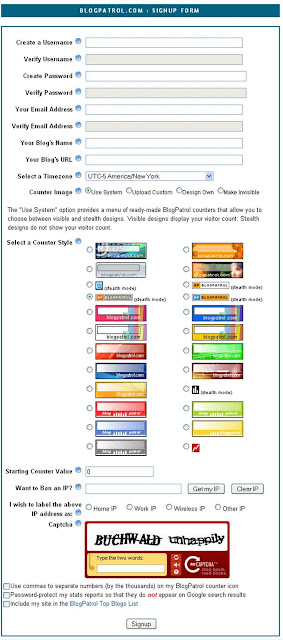
The following instructions correspond to each of the data fields that you need to complete in order to signup for a BlogPatrol account:
  • Create a Username: Select a username that is memorable to you and different from any other username in the BlogPatrol system. You may use letters and numbers, not use spaces, in your username. Both usernames and passwords are cAsE sEnsItiVe, and neither can exceed 255 characters in length.
  • Create Password: Type in a password for your new BlogPatrol account. The password must be a minimum of four (4) letters, numbers or special characters.
  • Verify Password: Type your password again to verify it is the one you want.
  • Your Email Address: It is important to register a working email address with your BlogPatrol because BlogPatrol will email your new account information and password to you for your records. On rare occasions, we email announcements regarding the BlogPatrol service. We will only ever email in you regard to your BlogPatrol account or the BlogPatrol service. For more info, visit the BlogPatrol privacy policy, terms of use, and conditions of service.
  • Your Blog's URL: Type in the address or URL of the blog or website that you want BlogPatrol to track for you. Can BlogPatrol track more than one blog for you? Yes, visit this post for details.
  • Select a Timezone: BlogPatrol now displays your stats reports in the timezone that you select. Use the drop-down list to select your preferred timezone.
  • Select a Counter Style: BlogPatrol currently offers 18 visible counter widget styles that display your total unique visitors count. We also provide 6 stealth counter widget styles that do not display any numbers. You're welcome to choose any counter style, and you can change the style any time by logging in, selecting a different style, and clicking the Modify button. Remember that our terms of use require that you must display the BlogPatrol counter icon on your blog or website in order for your account to work properly.
  • Starting Counter Value: You can type in the value that you want for your BlogPatrol account. The default starting value for a new account is zero.
  • Want to Ban an IP? You can use the Get my IP button to identify and ignore the Internet Protocol (IP) address of the computer that you are using to signup for your BlogPatrol account. Use the Clear IP button to remove any IP address that you no longer want BlogPatrol to ban (ignore).
  • I wish to label the above IP address as: Select one of the following labels for this IP address : home, work, wireless or other. You may notice that the default label is Home IP, but you can update the address or change the label any time.
  • Verify Image (Captcha): Verify the image by typing the word that appears inside the image box. If you are unable to read the image displayed, then you can generate a new one by clicking on the Click Here link. This function helps BlogPatrol to prevent spam-related signups, lost password requests, and email solicitations. Wikipedia provides a helpful article explaining why is called "Captcha" (Completely Automated Public Turing test to tell Computers and Humans Apart).
  • __ Use commas to separate numbers (by the thousands) on my BlogPatrol counter icon: For example, if you select this option, then your counter icon will display your stats as "1,000,000" unique visitors. If you do not select this option, then your counter icon will display the same number as "1000000" unique visitors.
  • __ Password-protect my stats reports so that they do not appear in Google's search results: For more information on this option, refer to the details provided in our privacy policy.
  • __ Include my site in the BlogPatrol Top 100 List: Select this option to include your blog in the publicly viewable directory of BlogPatrol's highest ranking blogs by total hit counts. To see the current rankings, go to Top Blogs. For more information on this option, refer to the details provided in our privacy policy.
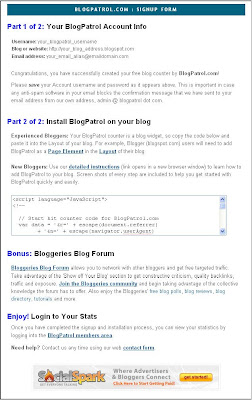
To view a screen shot of the BlogPatrol signup form in its entirety, click on this image:


Once you have signed up for your BlogPatrol account, you will get the following Success Form (click on the image to see an enlarged version of the sceenshot):


If you're unfamiliar with how to install blog widgets like BlogPatrol's countercode, check out our install instructions for adding BlogPatrol to your Blogger blog (e.g., yourblog.blogspot.com).

If you have a question that requires individualized attention, please email us using our contact form. Thanks for signing up for BlogPatrol!

If you like this article, then click on this link to "Digg It" and help promote BlogPatrol.com. Thanks!

Sunday, June 3, 2007

Problem viewing stats in my timezone

Last updated: June 7, 2007, 7:49 AM Eastern (UTC -4 America/New York)

Bug Report: My stats reports are not displaying properly, and my customized timezone is in the range of UTC-5 to UTC-11:

  • I selected a timezone within the range of UTC-5 to UTC-11 for my BlogPatrol account.
  • When I check my stats, I see only the basic stats for Total Visitors and Hits as well as Today's Visitors and Hits.
  • I am unable to view any of the detailed graphs or reports that show Visitor Activity, Visitor Technology, and Detailed Analysis Of The Last 25 Visitors.
Error: The stats reporting gets broken when the calendar date of your selected timezone is one day behind the BlogPatrol server's calendar date:
  • BlogPatrol's servers are running on "UTC-4 America/New York" and the corresponding calendar date is now June 3, 2007, as of the posting of this bug report.
  • Any timezone for which the date is still June 2, 2007, is causing the system to render only the basic stats totals. None of the stats graphics and reports are visible.
  • The bug goes away when the calendar date of your timezone catches up to the calendar date of the server timezone.
Temporary Fix: Login to your BlogPatrol account and change the timezone to "UTC-4 America/New York", which is the timezone of the BlogPatrol servers.
  • You will be able to see all your stats reports when your timezone is the same as the server's timezone.
  • This suggestion is recommended as a temporary fix only, until we resolve this error.

Status: Unresolved

  • Bug reported on 6/2/2007
  • Identified error on 6/3/2007
  • Identified temporary fix on 6/3/2007
  • Testing solution on 6/5/2007
  • Solution failed testing... back to the drawing board on 6/6/2007
  • ...We are working actively to resolve this error...
Long-term solution: We are currently researching additional solution options to this error since the first try didn't work; we'll be posting updates as soon as we have more info.

If you like this article, then click on this link to "Digg It" and help promote BlogPatrol.com. Thanks!

Monday, May 28, 2007

How do I delete my BlogPatrol account?

To delete your account, use BlogPatrol's contact form to send us an email with the subject "DELETE".

Include any or all of the following with your email request:

  • the email address registered with your BlogPatrol account,
  • the user name of your account, and/or
  • the address of your blog so that we can locate your account in our database.
We will send you an email confirming the deletion of your account information, including your email address from our system.

If you like this article, then click on this link to "Digg It" and help promote BlogPatrol.com. Thanks!

Friday, May 25, 2007

How do I use BlogPatrol to track more than one blog?

Question: "...love your counter and would like to add a counter to a 2nd blog -- is that possible and how would i do so?"

Answer: You have two options for using BlogPatrol to track multiple blogs.

Option 1: Using only one BlogPatrol account

a. It is possible to use a single BlogPatrol account to track multiple blogs, but this is not an ideal use of the system.

b. BlogPatrol will track any website on which you place the BlogPatrol countercode (as long as the website allows javascript). Therefore, copy the same BlogPatrol countercode to as many blog templates as you like.

c. Using this method, you will only need one BlogPatrol account.

d. Benefit: You only have to login to one BlogPatrol account to track all of your
statistics.

e. Drawback #1: Your one BlogPatrol stats report will show results from
multiple blogs (some would perceive this as a benefit).

f. Drawback #2: BlogPatrol will record only one unique visit from the same computer for a given 24-hour period, even if the computer visits multiple blogs during that 24-hour period.

or

Option 2: Using two different BlogPatrol accounts

a. It is best to have a separate and different BlogPatrol account for each of your blogs.

b. Create a brand new BlogPatrol account and add the countercode from the new account to your second blog.

c. Benefit: The stats reports are completely separate (some would perceive this as a drawback).

d. Drawback: You have to login to two different accounts.

We are looking at more elegant methods to satisfy this requirement in future editions of BlogPatrol.

If you like this article, then click on this link to "Digg It" and help promote BlogPatrol.com. Thanks!

Tuesday, May 22, 2007

Bug Report - Changing password forces undesired logout

Bug Report: "When I try to change my password or settings it just takes me back to the login screen, which I had just entered my information into."

Error: To keep a user logged into his/her account, the system looks for a matching username and password cookie. As soon as a user changed their password, the cookie information no longer matched -- and the system required the user to re-log back in.

Progress:

  • Bug reported on 5/22/2007
  • Identified error on 5/23/2007
  • Tested solution in Internet Explorer and Firefox on 5/24/2007
  • Implemented solution on 5/24/2007
BlogPatrol's Solution: Coded changes for the system to seamlessly reset the cookie to the user’s new password without requiring the user to input their credentials again.

Action that you may need to take: If you're still having trouble logging in and/or changing settings on your BlogPatrol account, try clearing the cookies on your computer. If you are not sure how to do this, then follow these instructions:
Internet Explorer browser
1. Click on Tools -> Select Delete Browsing History
2. Click on the Delete all... button
3. Select the checkbox that says "Also delete files and settings stored by add-ons."
4. Click the Yes button
5. A status window should appear for at least a few seconds showing that the browser is removing the cookies and the browser information.
and
Firefox browser
1. Click on Tools -> Select Options
2. Click on the icon labeled Privacy
3. Click on the Settings button in the section labeled Privacy Data
4. Select the checkboxes for cookies and cache
5. Click on the OK button
6. Click on the Clear now button
7. Click on the OK button
Now, as a test, login to your BlogPatrol account, change password or another account setting, go back to "counter options" (are you still logged in? ...you should be!). Now logout and then log back in using the new password.

Are you still having problems with staying logged in? Check the settings of any anti-spyware and/or anti-virus software running on your computer:
Try adding http://www.blogpatrol.com as either (a) a trusted site and/or (b) site from which your computer allow "cookies" in your anti-spyware, anti-virus, and Internet browser settings.
Please let us know if you encounter any problems with this issue.

If you like this article, then click on this link to "Digg It" and help promote BlogPatrol.com. Thanks!

Monday, February 12, 2007

How do I add BlogPatrol to my blog?

Please Note: Getting a free BlogPatrol account involves two parts:

  1. SIGNING UP for a BlogPatrol account
  2. INSTALLING the BlogPatrol code on your blog (read on)
The following instructions are to help you install the BlogPatrol code onto your blog. Click on the instructions that apply to your blog hosting provider:
  • Blogger or Blogspot.com blogs (e.g. yourblog.blogspot.com): Install using Page Elements

  • TypePad.com blogs (e.g. yourblog.typepad.com): Install using Notes Typelist or Advanced Templates

  • Instructions for more blog types coming soon...

Feel free to contact us any time with questions about installing BlogPatrol to your blog.

Last updated on January 26, 2008, at 4:00 PM UTC-5 America/New York.

If you like this article, then click on this link to "Digg It" and help promote BlogPatrol.com. Thanks!

Friday, December 29, 2006

Adding BlogPatrol to the new Blogger platform

Blogger.com finalized the release of its new platform around mid-December 2006 (the platform was previously run as Blogger Beta for a few months). I don't know how long Blogger.com (or its parent, Google) will run both the legacy platform alongside the new one, but it's a safe bet that it won't be forever!

As for making the change, a number of bloggers who host their blog from the yourblog.blogspot.com domain have reported problems with moving the code from third party services such as BlogPatrol to the new platform.

For help, I recommend using the instructions we've provided at http://www.blogpatrol.com/blogger-beta.php. If you're still having any issues with BlogPatrol on the new Blogger, please email us at our support address: support at blogpatrol.com.

If you like this article, then click on this link to "Digg It" and help promote BlogPatrol.com. Thanks!